Appointment Pro
Sends booking confirmations, reminders and cancellation notices to customers on WhatsApp.
Learn more
How to give your apps WhatsApp messaging, share your ChatFlow plan, and control access and limits — with a clear picture of what your app owners see on their side.
WhatsApp sending is powered by ChatFlow, purchased separately from your AppMinCMS license.
| Role | Where | Controls |
|---|---|---|
| You — Super Admin | Backoffice → WhatsApp module settings | The shared ChatFlow key, which apps get access, each app’s monthly limit |
| App owner | Their app → Settings → Notifications | Connecting their number, sending messages, templates, logs |
An app can get WhatsApp in one of two ways.
Why share your plan? Your clients get “WhatsApp included” without buying anything, you keep central control, and one upgrade on your side scales everyone.
No platform key yet? The backoffice shows a setup screen instead of the table. Apps can still connect with their own keys in the meantime.

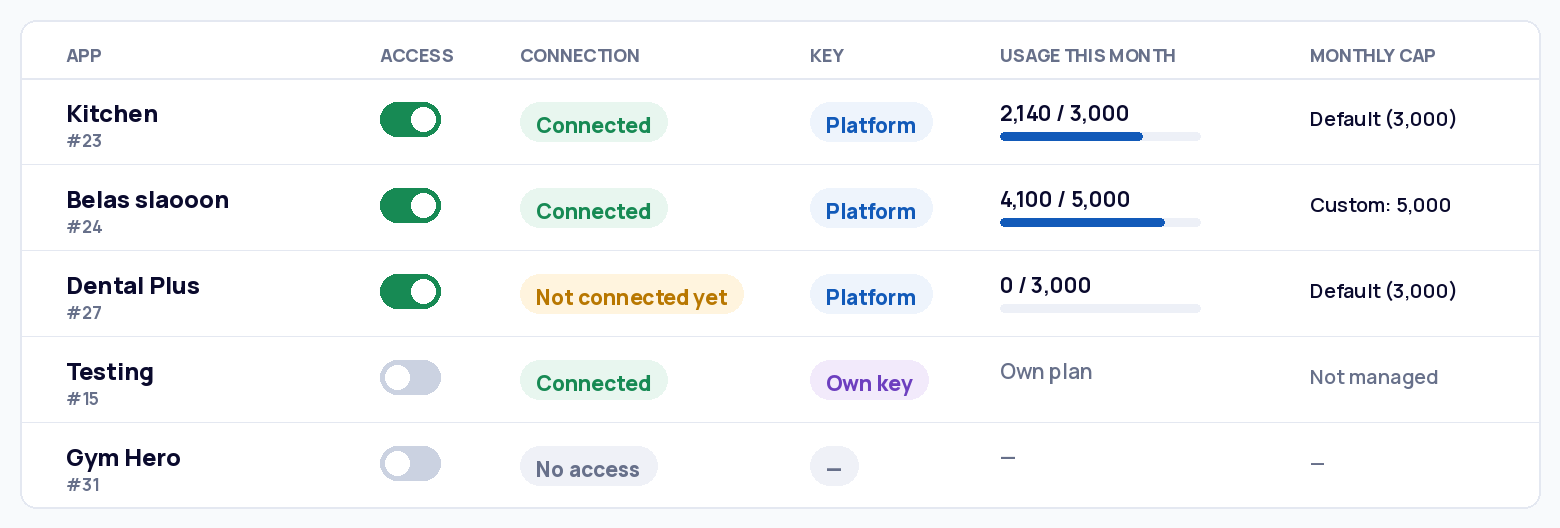
Switching Access off stops that app’s WhatsApp sending immediately. No templates and logs are kept, and switching back on restores everything. Own-key apps are never affected by this switch.
Good practice: start with a modest default (2,000–3,000/month), use Custom for bigger clients, and move heavy senders to their own ChatFlow plan.
Both you and the app owner see a warning as an app approaches its limit, so the pause never comes as a surprise.
App owners never see technical details — no API fails, no session names. Their connection screen is one simple card that changes with the situation.
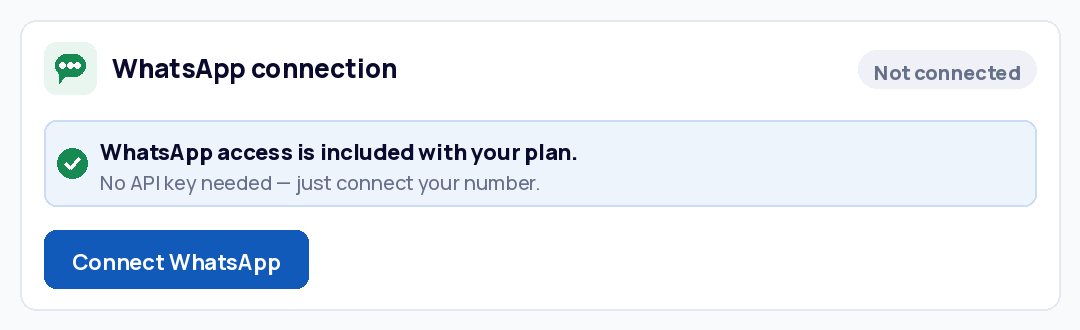
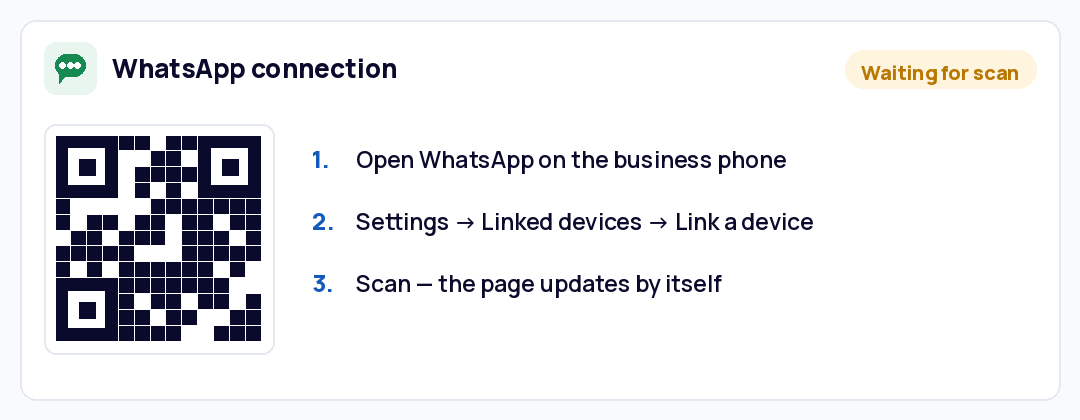
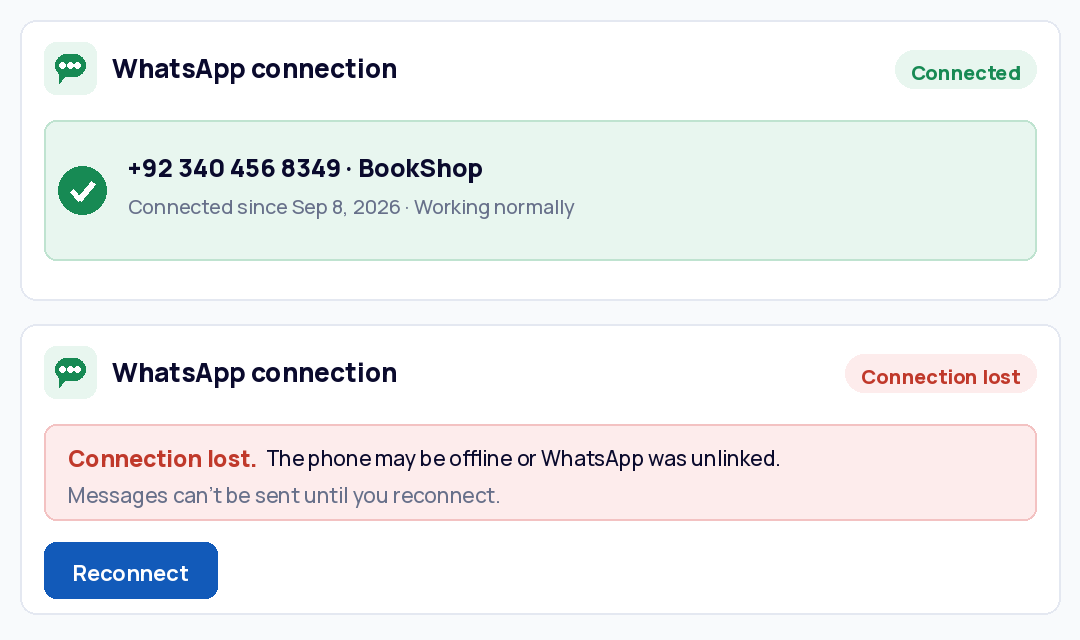
If you haven’t granted access, the same card asks for the app’s own ChatFlow key instead — with a link to buy a plan. Everything other than the QR state is identical.
Once connected, app owners get three tabs in the WhatsApp module.
The WhatsApp module is also the sending engine for other modules. When an app uses these, the WhatsApp connection above must be set up first — their WhatsApp notifications go out through it.
Sends booking confirmations, reminders and cancellation notices to customers on WhatsApp.
Learn moreTrigger automated scheduled messages via WhatsApp, Push, and Email — using the WhatsApp connection and templates you already have.
Learn moreGood to know for support — if a client says “appointment reminders aren’t arriving on WhatsApp”, check the WhatsApp connection and the app’s message limit first — those modules send through this one.
Messages sent by these modules count toward the app’s monthly cap, the same as manual sends.
| You want to… | Do this |
|---|---|
| Give a new client WhatsApp | Switch their Access on — they connect in Settings → Notifications. |
| Cut off an app now | Switch Access off — sending stops at once, nothing is deleted. |
| Give one client a bigger limit | Change their cap to Custom with a new number. |
| Raise limits for everyone on Default | Change the platform default value — all Default apps follow. |
| Move a heavy client to their own plan | They buy their own ChatFlow plan and reconnect — switch your Access off for them — your connection frees up. |
| Connect more apps than the plan allows | Upgrade on chatflow.oxtracode.com, or move an app to its own key. |
| Change plan or billing | Always on chatflow.oxtracode.com — the backoffice only holds the key. Use Replace key if a new one is issued. |
| Symptom | Likely cause | Fix |
|---|---|---|
| “Not connected yet” for weeks | Owner never scanned the QR | Ask them to connect in Settings → Notifications with the business phone. |
| Was working, now “Connection lost” | Business phone offline, or device unlinked in WhatsApp | Owner presses Reconnect and re-scans. Keep the business phone charged and online. |
| Message failed — “number not on WhatsApp” | Customer’s phone number is wrong or has no WhatsApp | Owner corrects the number in the Accounts module. |
| An app suddenly can’t send | Cap reached, Access off, or plan volume used up | Check the app’s Usage and Access, then your “Messages this month” card. |
| Appointment reminders not arriving on WhatsApp | WhatsApp connection or cap issue — Appointment Pro sends through this module | Check the connection status and the app’s limit first. |
| New app can’t connect at all | Plan connections full | Upgrade the plan or move an app to its own key. |
| Whole platform can’t send | Platform key invalid or plan expired | Check your ChatFlow dashboard; use Replace key if a new one is issued. |
First question for any ticket: is the app on the Platform key or its own key? Own-key issues live in that client’s ChatFlow account, not in your backoffice.