

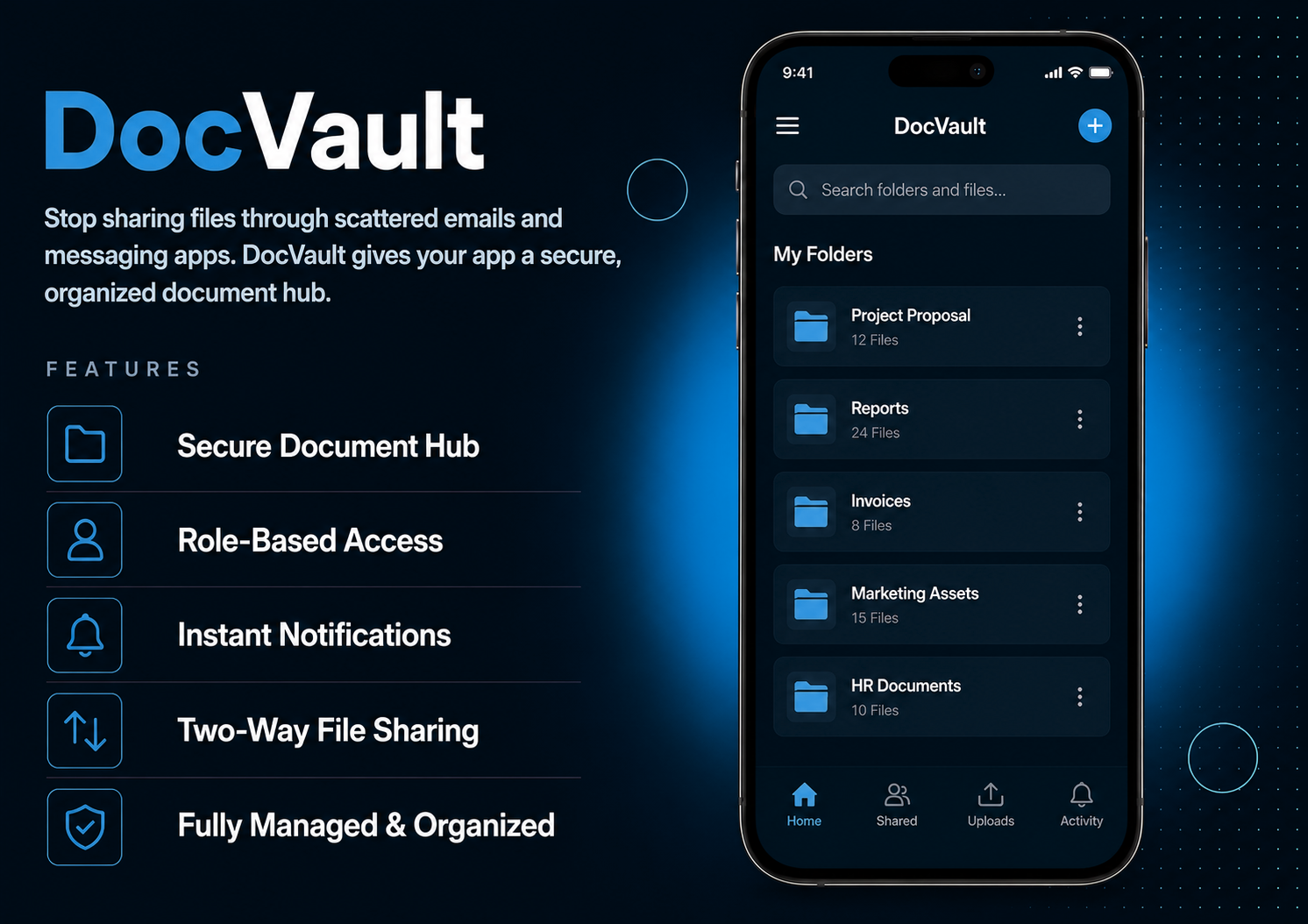
Stop sharing files through scattered emails and messaging apps. DocVault gives your app a secure, organized document hub where you upload folders and files for specific users, control who has access, and get notified the moment something new is uploaded. Clean, simple, and fully managed from your dashboard.Users open the app and instantly see their shared folders tap to browse files, view details, and open or download documents directly. They can also upload files back to you straight from the mobile app, which land automatically in their folder and notify you instantly. Full two-way document sharing, no third-party tools needed.
The admin panel gives you full control over every aspect of document sharing. Enable or disable individual users to grant or revoke access instantly. Create folders per user, define allowed file types, and upload files directly into the right folder. View all documents uploaded by users — tagged clearly so you always know the source. Configure push and email notifications for every event — new file shared, user enabled, or document uploaded by a user — with full personalization using dynamic variables.
Users open DocVault and see a clean list of all folders shared by the admin — searchable and sortable for easy navigation. Tap any folder to view the files inside, with each file showing its name, type icon, size, and upload date. Open or download any file directly inside the app with one tap. Users can also upload documents back to the admin straight from their mobile — the file is saved automatically and the admin is notified instantly.
All features available as soon as the module is unlocked. No extra configuration.




All features available as soon as the module is unlocked. No extra configuration.








Everything you need to know about AppMin CMS
Yes — enable or disable any user anytime. Disabled users immediately lose access to all shared files.
Yes — users can upload files directly from the app and they appear instantly in their folder on your dashboard.
Yes — create as many folders as needed for each user to keep documents organized and easy to find.
Yes — automatic push and email notifications are sent whenever a new file is shared or access is granted.
Yes — define your own allowed file types with custom icons so only the right files are accepted.
Join 2,400+ businesses, agencies and resellers already building with AppMinCMS. Pick your path and start today.
WhatsApp us
Everything you need to build, launch and grow
Built for every type of business — pick your use case

Please enter your name and email below, and we’ll send you your demo platform link, username, and password directly to your inbox. Explore our platform and discover how it can transform your business!

Our team will contact you soon!
Still having trouble?
Our team will get you set up right away
Your lifetime plan request has been received. Our team will contact you shortly.

WE’LL CONTACT YOU AT
Usually within 24 hours
If you don’t hear from us, please check your spam folder or wait up to 24 hours.
Still having trouble?
Our team will get you set up right away
Your request has been received. Our team will contact you shortly.
WE’LL CONTACT YOU AT
Usually within 24 hours
If you don’t hear from us, please check your spam folder or wait up to 24 hours.
Still having trouble?
Our team will get you set up right away
Your free trial account has been created.
Check your inbox to get started.
Login details sent to
Usually arrives within 1–2 minutes
If you don't see it, check your spam or junk folder, search for "AppMinCMS", or wait up to 5 minutes.
Still having trouble?
Our team will get you set up right away
Pay once. Own it forever — no monthly fees, no surprises.
By signing up you agree to our Terms of Service and Privacy Policy. We never share your data with third parties.
Tell us a little about your business, deployment needs, and Enterprise requirements. This takes around 3 minutes and helps us recommend the right setup.
These services are available by agreement and may affect the final Enterprise proposal.
Our team will review your requirements and contact you personally with the next steps. For Enterprise requests, we usually recommend a short call so we can understand your deployment needs, support expectations, app volume, and license structure properly.