

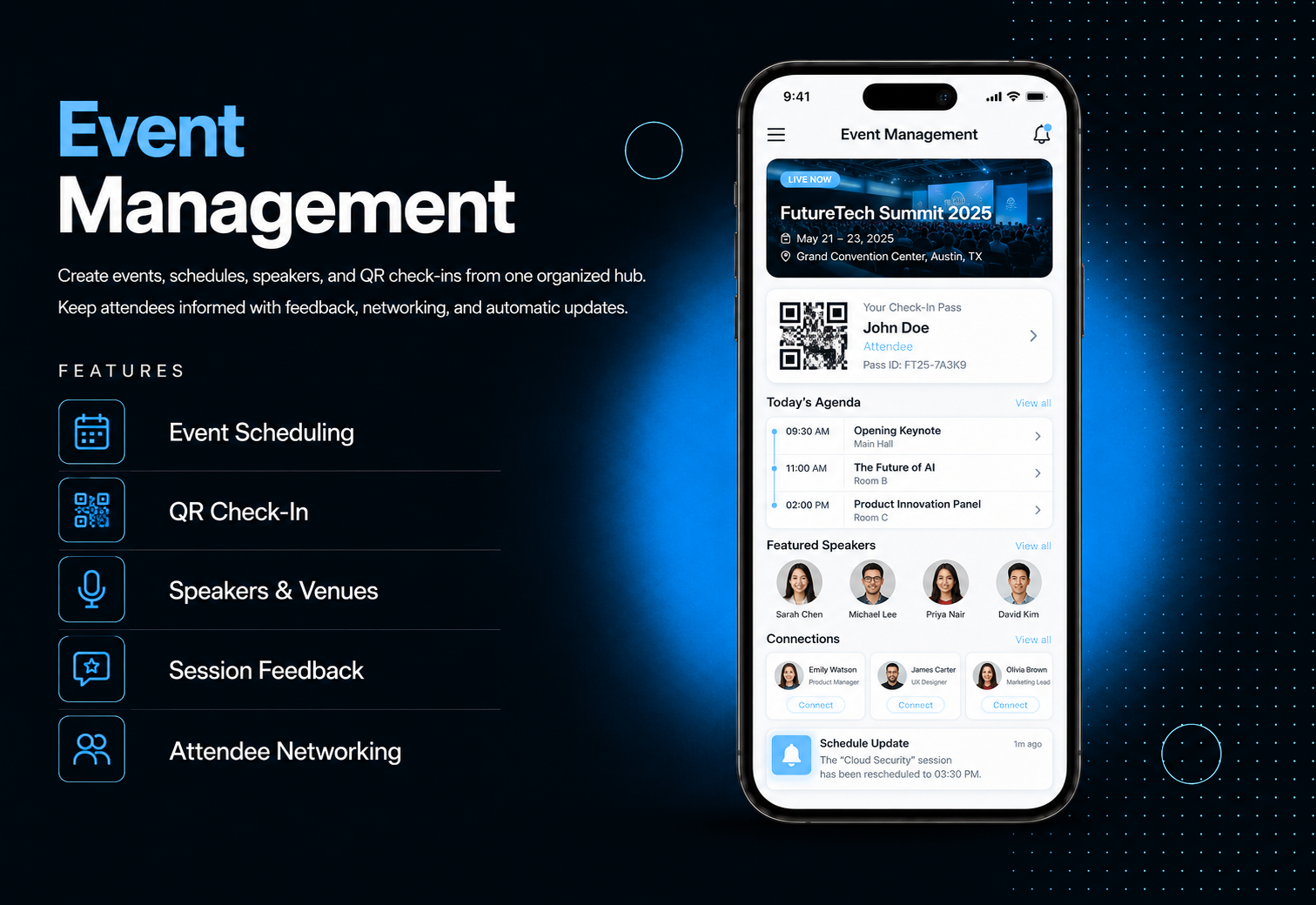
Run every aspect of your event from one place. Event Management lets you create events, build multi-day schedules, manage speakers and venues, handle attendees, and check people in via QR code all directly inside your app. No third-party tools, no scattered spreadsheets.Add sponsors with tiered display, enable session feedback so attendees rate talks in real time, and let attendees network with each other through in-app profiles and connection requests. Automatic push and email notifications keep everyone informed about schedule changes, cancellations, and reminders sent without any manual effort from your team.
The admin panel gives you complete control over every element of your event. Create events with categories, descriptions, dates, and venue assignments. Build a full multi-day, multi-track schedule with sessions assigned to speakers, rooms, and tracks. Manage speaker profiles, venue rooms, and sponsor tiers. Add or import attendees via CSV — each receives a unique QR code automatically. Assign staff members with scanner-only access for controlled check-in management. Cancel or postpone events with automatic attendee notification, and send manual announcements to all attendees of any event in seconds.
Attendees open the module and browse events by category, filtered and sorted to find what matters to them. Each event detail page shows the full schedule organized by day and track, speaker profiles with bios and social links, venue details with a map, and sponsors organized by tier. Attendees save sessions to their personal My Schedule for a customized agenda, check in at the event by displaying their unique QR code, and check out on the second scan, rate sessions as they end, and connect with other attendees through in-app networking — all without leaving the app.
All features available as soon as the module is unlocked. No extra configuration.






All features available as soon as the module is unlocked. No extra configuration.







Everything you need to know about AppMin CMS
Yes — sessions can be assigned to specific days and tracks, and attendees can filter the schedule by both day and track in the mobile app.
Each attendee receives a unique QR code after registration. Staff scan the code at event entry using the scanner in their mobile app. If session check-in and check-out is enabled, the same QR code is scanned at each session room entry.
Yes — upload a CSV file with attendee names, emails, and optional phone numbers. QR codes are generated automatically for all imported attendees and duplicate emails per event are skipped.
Staff have scanner-only access — they can only see the QR scanner screen. They cannot access event management, attendee data, or any other module features.
Yes — when an admin cancels or postpones an event, all registered attendees automatically receive a push notification and email with the reason and, for postponements, the new event date.
Join 2,400+ businesses, agencies and resellers already building with AppMinCMS. Pick your path and start today.
WhatsApp us
Everything you need to build, launch and grow
Built for every type of business — pick your use case

Please enter your name and email below, and we’ll send you your demo platform link, username, and password directly to your inbox. Explore our platform and discover how it can transform your business!

Our team will contact you soon!
Still having trouble?
Our team will get you set up right away
Your lifetime plan request has been received. Our team will contact you shortly.

WE’LL CONTACT YOU AT
Usually within 24 hours
If you don’t hear from us, please check your spam folder or wait up to 24 hours.
Still having trouble?
Our team will get you set up right away
Your request has been received. Our team will contact you shortly.
WE’LL CONTACT YOU AT
Usually within 24 hours
If you don’t hear from us, please check your spam folder or wait up to 24 hours.
Still having trouble?
Our team will get you set up right away
Your free trial account has been created.
Check your inbox to get started.
Login details sent to
Usually arrives within 1–2 minutes
If you don't see it, check your spam or junk folder, search for "AppMinCMS", or wait up to 5 minutes.
Still having trouble?
Our team will get you set up right away
Pay once. Own it forever — no monthly fees, no surprises.
By signing up you agree to our Terms of Service and Privacy Policy. We never share your data with third parties.
Tell us a little about your business, deployment needs, and Enterprise requirements. This takes around 3 minutes and helps us recommend the right setup.
These services are available by agreement and may affect the final Enterprise proposal.
Our team will review your requirements and contact you personally with the next steps. For Enterprise requests, we usually recommend a short call so we can understand your deployment needs, support expectations, app volume, and license structure properly.