

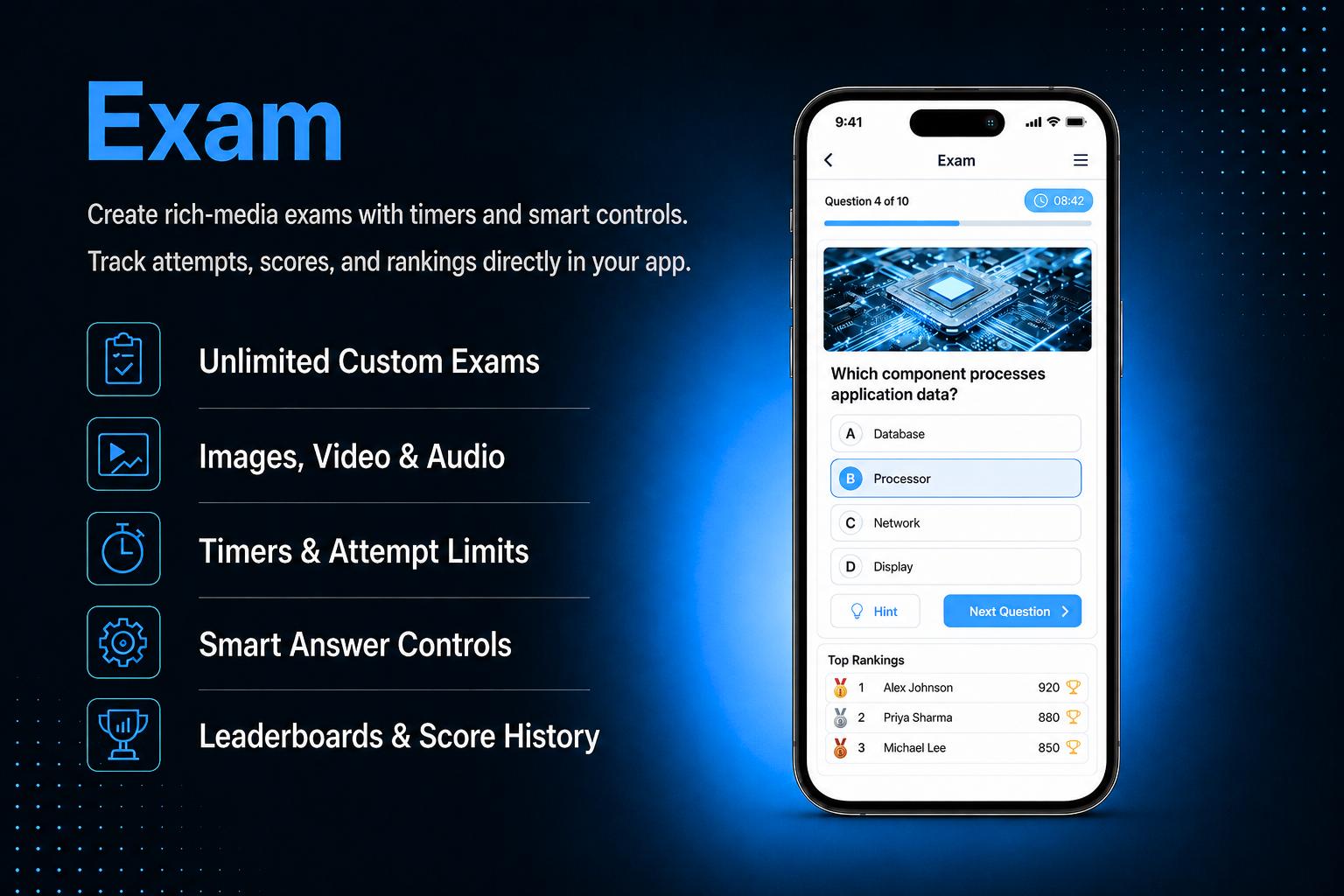
Turn your app into a powerful assessment platform no third-party tools needed. The Exam module lets you create unlimited multiple choice exams with images, videos, audio, timers, hints, and explanations all configured from your dashboard and taken by users directly inside the app.Control every detail of the exam experience randomize question order, set per-question timers, limit the number of attempts, and choose exactly when correct answers are revealed. A built-in leaderboard lets users compete and track their ranking, while Score History gives both users and admins a complete record of every attempt. Add the module multiple times for multiple independent exams.
The admin panel gives you complete control over every aspect of your exam. Create an exam with a name, cover image, description, instructions, and a custom completed message with an optional redirect button. Add unlimited questions of three types — Checkbox for multiple correct answers, Radio for one correct answer, and Information for instruction-only slides. Each question supports custom points, a per-question timer, optional hints and explanations, and media attachments including image, video, audio, and PDF. Configure exam behaviour from Settings — control how answers are shown, set a passing score, limit the number of attempts, randomize question order, enable hints, and manage the leaderboard. View and export all user scores from Score History — filter by exam, date range, or user name and export as CSV.
Users open the Exam module and see a welcome screen with the exam name, cover image, description, and instructions — the Start button only appears after instructions are fully read. Questions are shown one at a time with the question number, text, media player if media is attached, and answer options. A countdown timer appears per question if configured. After completing the exam, a result screen shows the score, pass or fail status, and a completed message. If enabled, all questions are reviewed with correct answers and explanations highlighted. Users can view their full attempt history and check their ranking on the leaderboard.
All features available as soon as the module is unlocked. No extra configuration.






All features available as soon as the module is unlocked. No extra configuration.








Everything you need to know about AppMin CMS
There is no limit — you can add as many questions as you need. Each question can be a different type and carry different points, so you have full flexibility to build exams of any length and complexity.
Yes — each question supports four types of media attachments: image, video, audio, and PDF. Media is displayed directly in the question screen in the app, making it possible to create rich, multimedia assessments.
Yes — you have three options. Show correct or incorrect feedback immediately after each question is answered, show all correct answers after the full exam is completed, or keep answers hidden entirely. These are configured independently in Settings.
This is fully configurable. Set Exam Access to 0 for unlimited attempts, 1 for a single attempt, or any other number for a specific limit. Once a user reaches the limit, the Start Exam button is disabled for that user.
Yes — the Exam module supports multiple instances. Each instance is a completely separate exam with its own questions, settings, leaderboard, and score history. Add as many exam instances as your app needs.
Join 2,400+ businesses, agencies and resellers already building with AppMinCMS. Pick your path and start today.
WhatsApp us
Everything you need to build, launch and grow
Built for every type of business — pick your use case

Please enter your name and email below, and we’ll send you your demo platform link, username, and password directly to your inbox. Explore our platform and discover how it can transform your business!

Our team will contact you soon!
Still having trouble?
Our team will get you set up right away
Your lifetime plan request has been received. Our team will contact you shortly.

WE’LL CONTACT YOU AT
Usually within 24 hours
If you don’t hear from us, please check your spam folder or wait up to 24 hours.
Still having trouble?
Our team will get you set up right away
Your request has been received. Our team will contact you shortly.
WE’LL CONTACT YOU AT
Usually within 24 hours
If you don’t hear from us, please check your spam folder or wait up to 24 hours.
Still having trouble?
Our team will get you set up right away
Your free trial account has been created.
Check your inbox to get started.
Login details sent to
Usually arrives within 1–2 minutes
If you don't see it, check your spam or junk folder, search for "AppMinCMS", or wait up to 5 minutes.
Still having trouble?
Our team will get you set up right away
Pay once. Own it forever — no monthly fees, no surprises.
By signing up you agree to our Terms of Service and Privacy Policy. We never share your data with third parties.
Tell us a little about your business, deployment needs, and Enterprise requirements. This takes around 3 minutes and helps us recommend the right setup.
These services are available by agreement and may affect the final Enterprise proposal.
Our team will review your requirements and contact you personally with the next steps. For Enterprise requests, we usually recommend a short call so we can understand your deployment needs, support expectations, app volume, and license structure properly.