

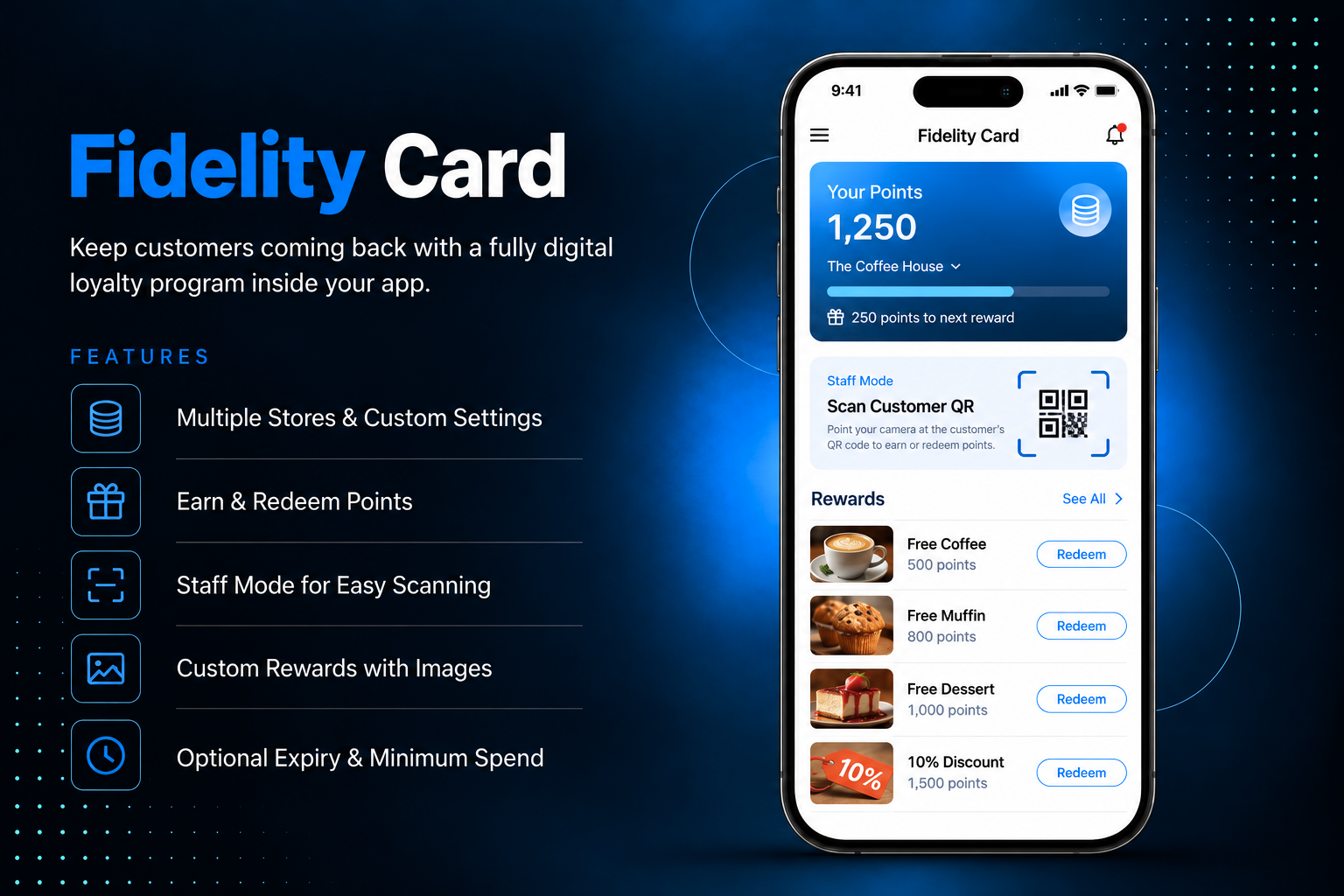
Keep customers coming back with a fully digital loyalty program inside your app. The Fidelity Card module lets customers earn points on every purchase at your stores, track their balance in real time, and redeem points for rewards no physical card, no paper stamps, no manual tracking needed.Create multiple stores each with their own points conversion rate, minimum spend, and optional expiry period. Define rewards with custom point costs and images so customers always know what they are working towards. Staff members use the app in Staff Mode to scan a customer’s QR code, add points for a purchase amount or manually, and redeem rewards on the spot all in a few taps.
The admin panel gives you complete control over your loyalty program across four tabs. In Stores, create each location with a name, address, points conversion rate per currency unit spent, optional minimum spend, and an optional points expiry period per store. In Rewards, add redeemable items with a title, point cost, description, and image — activate or deactivate any reward anytime. In Members, view all enrolled customers with their points balance, member code, and QR code — assign store access to make a member staff, manually adjust points with a reason, and reset a member's QR code if needed. The Dashboard shows total members, active customers, points earned, points redeemed, and a daily activity chart — filterable by date range and store.
Customers open the Fidelity Card and see their personal card with their current points balance, an expiry notice if points are about to expire, and their unique QR code to present at the store. The Rewards tab shows all available rewards with images, point costs, and descriptions tap any reward to view details and redeem if balance allows. The History tab shows a full transaction log every point earned, redeemed, or adjusted — with the store name, date, and reason. Login is required to access the card, keeping every member's balance personal and secure.


Everything you need to know about AppMin CMS
The customer opens the app and shows their QR code or member code to the staff member. The staff member opens the app in Staff Mode, scans the QR code or enters the code manually, selects the store, and enters either the spend amount or points directly. The system calculates points based on the store's conversion rate and adds them to the customer's balance instantly.
Yes — create as many stores as you need, each with its own conversion rate, minimum spend requirement, and points expiry period. Staff members are assigned to specific stores so they can only process transactions for the stores they are assigned to.
Points expiry is configurable per store. Set an expiry period in days and points earned at that store will expire after the configured period. Leave the expiry blank and points earned at that store never expire. Customers see a notice on their card when points are expiring soon.
The customer taps a reward from the Rewards tab and confirms the redemption. The staff member in Staff Mode can also redeem a reward after scanning the customer's QR code by selecting from the available rewards and confirming — the points are deducted from the customer's balance immediately and the new balance is shown on screen.
Yes — from the Members tab, admin can open any member's record and adjust their points balance by entering a positive number to add points or a negative number to deduct them. A reason is required for every manual adjustment and the change is recorded in the member's transaction history.
Join 2,400+ businesses, agencies and resellers already building with AppMinCMS. Pick your path and start today.
WhatsApp us
Everything you need to build, launch and grow
Built for every type of business — pick your use case

Please enter your name and email below, and we’ll send you your demo platform link, username, and password directly to your inbox. Explore our platform and discover how it can transform your business!

Our team will contact you soon!
Still having trouble?
Our team will get you set up right away
Your lifetime plan request has been received. Our team will contact you shortly.

WE’LL CONTACT YOU AT
Usually within 24 hours
If you don’t hear from us, please check your spam folder or wait up to 24 hours.
Still having trouble?
Our team will get you set up right away
Your request has been received. Our team will contact you shortly.
WE’LL CONTACT YOU AT
Usually within 24 hours
If you don’t hear from us, please check your spam folder or wait up to 24 hours.
Still having trouble?
Our team will get you set up right away
Your free trial account has been created.
Check your inbox to get started.
Login details sent to
Usually arrives within 1–2 minutes
If you don't see it, check your spam or junk folder, search for "AppMinCMS", or wait up to 5 minutes.
Still having trouble?
Our team will get you set up right away
Pay once. Own it forever — no monthly fees, no surprises.
By signing up you agree to our Terms of Service and Privacy Policy. We never share your data with third parties.
Tell us a little about your business, deployment needs, and Enterprise requirements. This takes around 3 minutes and helps us recommend the right setup.
These services are available by agreement and may affect the final Enterprise proposal.
Our team will review your requirements and contact you personally with the next steps. For Enterprise requests, we usually recommend a short call so we can understand your deployment needs, support expectations, app volume, and license structure properly.