

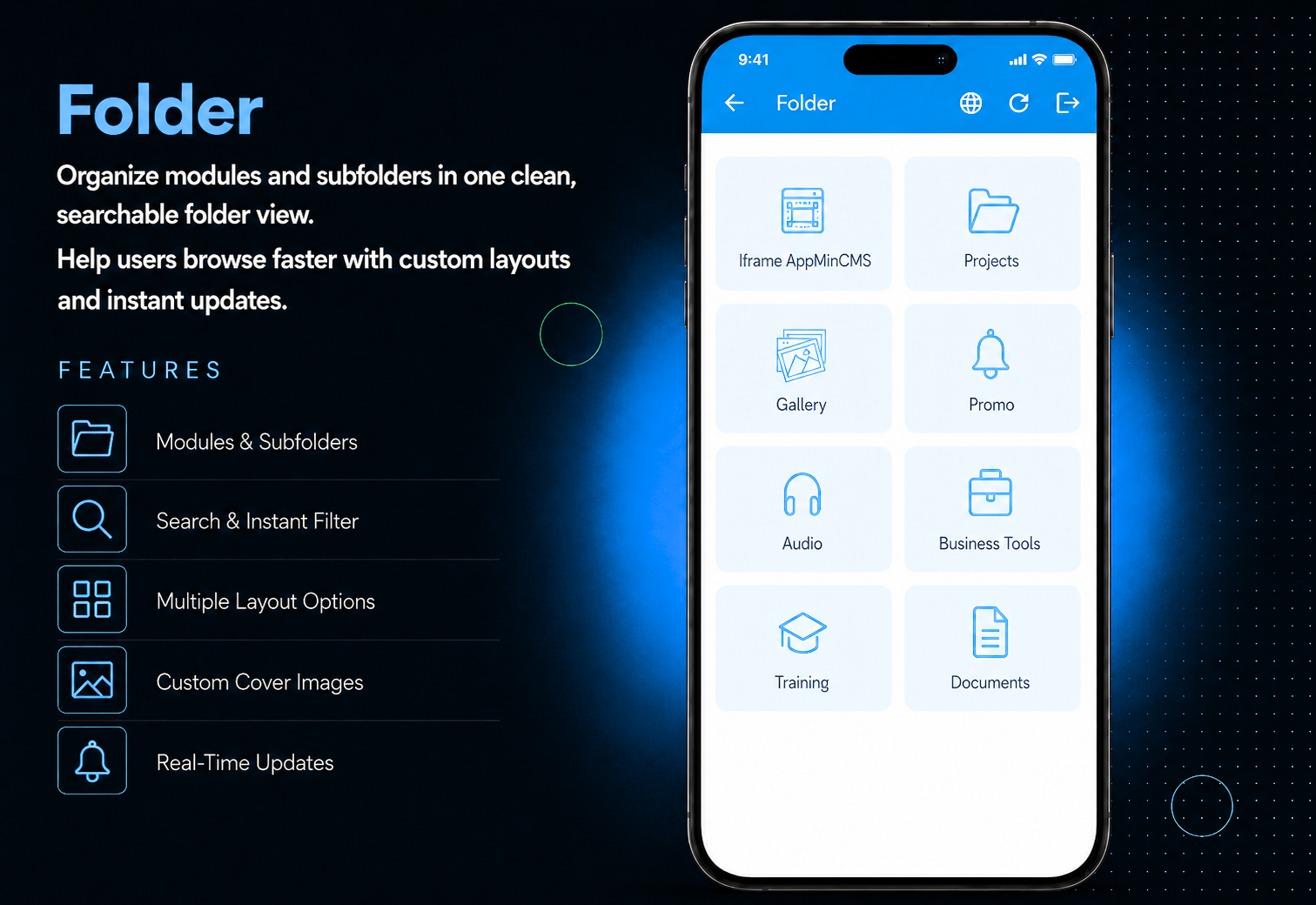
Give your app a clean, structured navigation without the clutter. Folder lets you group any combination of modules into organized folders with cover images, thumbnails, and optional subfolders so users always find what they need in seconds.Add any module inside a folder, create nested subfolders for multi-level organisation, and enable search so users can filter items instantly. Choose from multiple layout options to control how folder items are displayed, and configure card design settings to match your brand. Every change reflects in the app immediately no update required.
The admin panel gives you complete control over your app's navigation structure. Create a folder, set a title, subtitle, cover image, and thumbnail, then add any available module from the palette with a single click. Create subfolders inside folders for deeper multi-level organisation. Edit, reorder, or delete any folder or subfolder anytime. Choose a layout style for how items are displayed and enable search and card design from the settings — all changes reflect instantly across the app.
Users open the Folder and instantly see a beautifully structured screen — a full cover image at the top followed by a clean list of modules and subfolders, each with its own thumbnail, title, and subtitle. Tap any module to open it directly, or tap a subfolder to explore its contents. If search is enabled, users can filter items by title in seconds. Every new module the admin adds appears immediately — no waiting, no app updates needed.
All features available as soon as the module is unlocked. No extra configuration.






All features available as soon as the module is unlocked. No extra configuration.








Everything you need to know about AppMin CMS
Yes — any available module in your app can be added inside a folder or subfolder with a single click.
Yes — subfolders are fully supported, allowing you to create a structured multi-level navigation experience.
The module is immediately visible inside the folder in the app. If it was previously outside a folder, it moves inside and is no longer shown separately in the main navigation.
Yes — enable the search option from the settings and a search bar appears at the top for users to filter items by title.
Yes — any module, subfolder, or setting change reflects instantly in the mobile app without requiring an update.
Join 2,400+ businesses, agencies and resellers already building with AppMinCMS. Pick your path and start today.
WhatsApp us
Everything you need to build, launch and grow
Built for every type of business — pick your use case

Please enter your name and email below, and we’ll send you your demo platform link, username, and password directly to your inbox. Explore our platform and discover how it can transform your business!

Our team will contact you soon!
Still having trouble?
Our team will get you set up right away
Your lifetime plan request has been received. Our team will contact you shortly.

WE’LL CONTACT YOU AT
Usually within 24 hours
If you don’t hear from us, please check your spam folder or wait up to 24 hours.
Still having trouble?
Our team will get you set up right away
Your request has been received. Our team will contact you shortly.
WE’LL CONTACT YOU AT
Usually within 24 hours
If you don’t hear from us, please check your spam folder or wait up to 24 hours.
Still having trouble?
Our team will get you set up right away
Your free trial account has been created.
Check your inbox to get started.
Login details sent to
Usually arrives within 1–2 minutes
If you don't see it, check your spam or junk folder, search for "AppMinCMS", or wait up to 5 minutes.
Still having trouble?
Our team will get you set up right away
Pay once. Own it forever — no monthly fees, no surprises.
By signing up you agree to our Terms of Service and Privacy Policy. We never share your data with third parties.
Tell us a little about your business, deployment needs, and Enterprise requirements. This takes around 3 minutes and helps us recommend the right setup.
These services are available by agreement and may affect the final Enterprise proposal.
Our team will review your requirements and contact you personally with the next steps. For Enterprise requests, we usually recommend a short call so we can understand your deployment needs, support expectations, app volume, and license structure properly.