

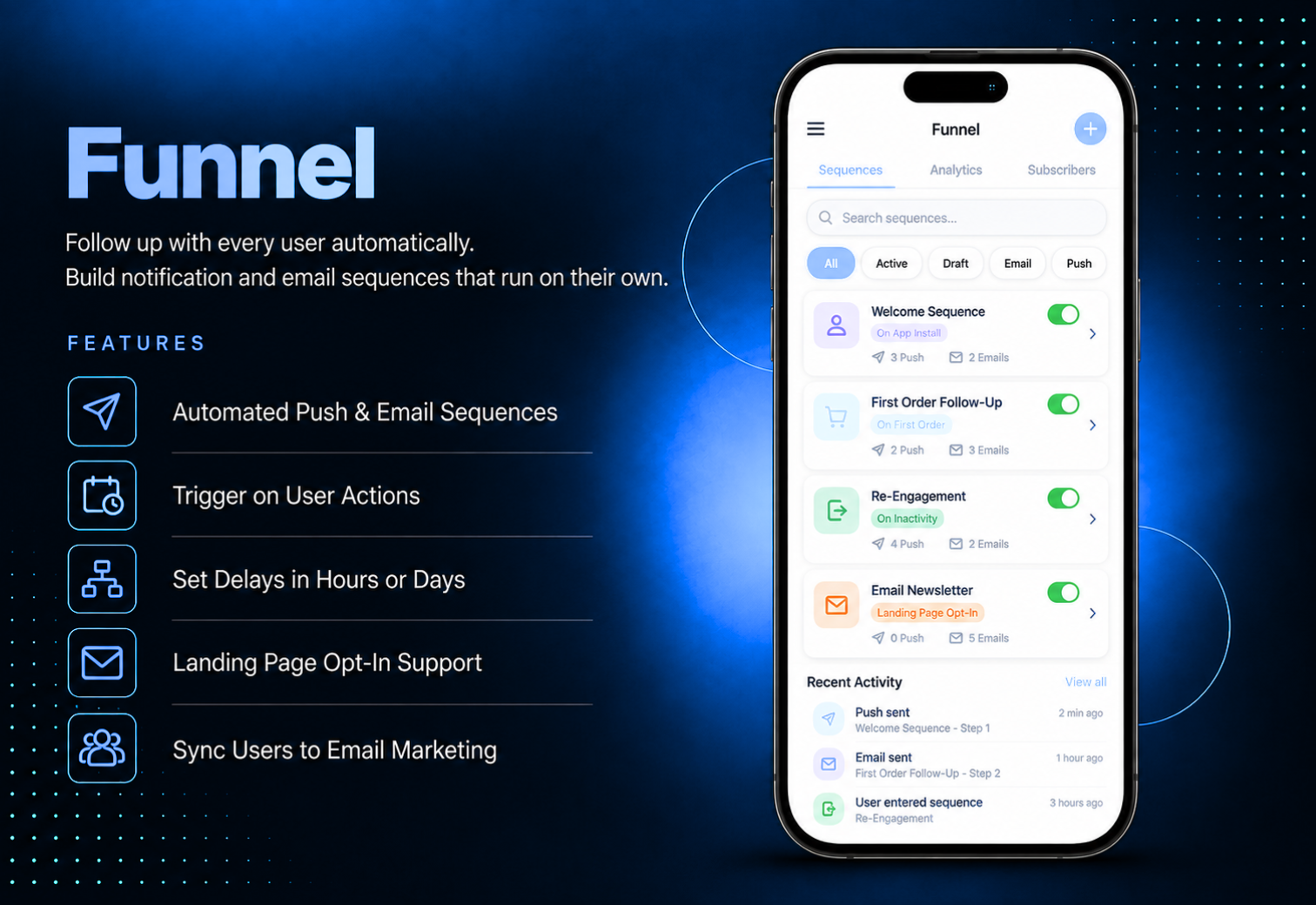
Follow up with every user automatically, without sending a single message by hand. Funnel lets you build sequences of push notifications and emails that start when a user takes a specific action, such as installing the app, logging in for the first time, or placing their first order. Set it up once and the follow-ups run on their own.Each message in a sequence is sent after a delay in hours or days from the one before it, so you can plan a welcome message on day one and a follow-up every week for a full year. Email funnels can also start from a landing page opt-in form, working like an autoresponder for your website visitors. User emails can be synced to your email marketing platform based on the actions they take in the app.
The admin panel has separate tabs for push funnels and email funnels. Create a funnel with a title, description, and the trigger event that starts it, and choose whether existing users should also be included. Add the first message, then add as many follow-up messages as you need, each scheduled a set number of hours or days after the previous one. Push messages support a title, text, optional cover image, and a link to an app feature or custom URL. Email messages support a subject, message body, and optional attachment. Email funnels can use a landing page trigger that gives you a ready-made form code to paste on your website. In Settings, configure your SMTP server, sender name, sender email, and reply-to address, connect an email marketing platform, and set the GDPR privacy text.
Users receive push notifications and emails that match what they have done in the app. A new user can get a welcome push right after installing, a thank-you email after their first order, or a reward reminder after their first loyalty point. Push notifications can open a specific page of the app or a web link, so every message leads somewhere useful. The app menu includes an unsubscribe page, so users can stop automated pushes whenever they choose, and all their pending scheduled pushes are cancelled.
All features available as soon as the module is unlocked. No extra configuration.


All features available as soon as the module is unlocked. No extra configuration.


Everything you need to know about AppMin CMS
Funnels can start on events such as a new device install, a user's first login, their first loyalty point, their first order, or their first coupon used. Email funnels can also start when a visitor submits the opt-in form on your landing page. Some triggers only appear when the related module is added to your app.
There is no limit. After saving the first message, you can add as many follow-ups as you need, each scheduled a set number of hours or days after the message before it.
Yes. When creating a funnel, use the Add Old Users option to decide whether existing users should also receive the sequence, or only users who trigger the event from now on.
The module adds an unsubscribe page to your app menu. When a user unsubscribes from automated pushes, all push notifications already scheduled for that user are cancelled.
Yes. Funnel works with Mailchimp, Kartra, and Brevo. You can choose a list and segment for each trigger, and user emails are added to the matching list when they take that action in the app. The sync runs automatically several times a day.
Join 2,400+ businesses, agencies and resellers already building with AppMinCMS. Pick your path and start today.
WhatsApp us
Everything you need to build, launch and grow
Built for every type of business — pick your use case

Please enter your name and email below, and we’ll send you your demo platform link, username, and password directly to your inbox. Explore our platform and discover how it can transform your business!

Our team will contact you soon!
Still having trouble?
Our team will get you set up right away
Your lifetime plan request has been received. Our team will contact you shortly.
WE’LL CONTACT YOU AT
Usually within 24 hours
If you don’t hear from us, please check your spam folder or wait up to 24 hours.
Still having trouble?
Our team will get you set up right away
Your request has been received. Our team will contact you shortly.
WE’LL CONTACT YOU AT
Usually within 24 hours
If you don’t hear from us, please check your spam folder or wait up to 24 hours.
Still having trouble?
Our team will get you set up right away
Your free trial account has been created.
Check your inbox to get started.
Login details sent to
Usually arrives within 1–2 minutes
If you don't see it, check your spam or junk folder, search for "AppMinCMS", or wait up to 5 minutes.
Still having trouble?
Our team will get you set up right away
Pay once. Own it forever — no monthly fees, no surprises.
By signing up you agree to our Terms of Service and Privacy Policy. We never share your data with third parties.
Tell us a little about your business, deployment needs, and Enterprise requirements. This takes around 3 minutes and helps us recommend the right setup.
These services are available by agreement and may affect the final Enterprise proposal.
Our team will review your requirements and contact you personally with the next steps. For Enterprise requests, we usually recommend a short call so we can understand your deployment needs, support expectations, app volume, and license structure properly.