

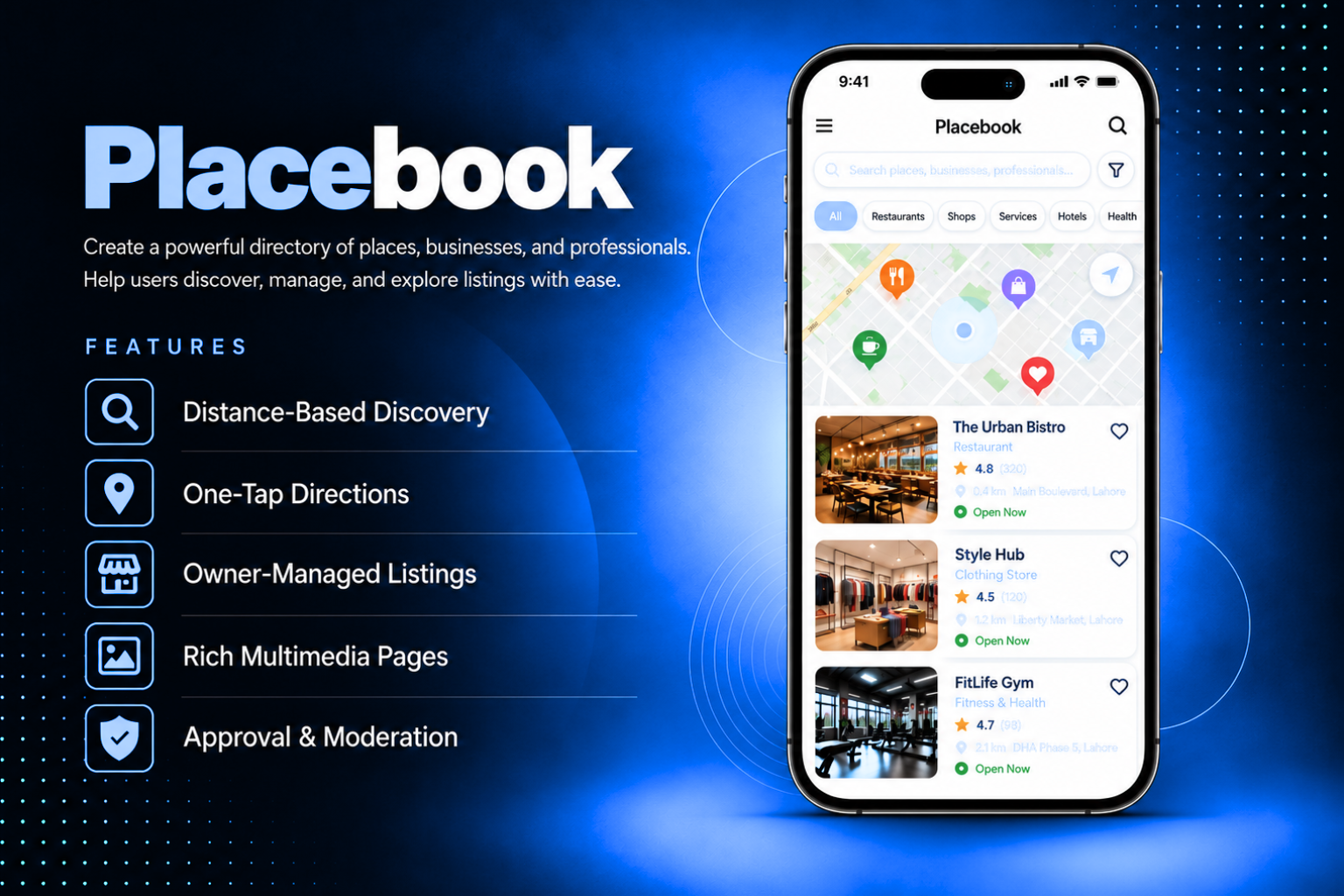
Give your app a fully interactive directory of places, businesses, and professionals — each with their own multimedia page, map location, and rich content. Placebook sorts listings by distance from the user, lets them get directions in one tap, and allows business owners to manage their own pages directly with or without your approval.Create a professional marketplace, a local business directory, a sponsor showcase, or a venue finder all from one module. Assign any listing to an external business owner who gets their own web login to update their page content, images, and details independently. Enable moderation so every change goes through your approval before going live or trust selected owners to publish directly.
The admin panel gives you complete control over every listing and directory setting. Add places with a title, subtitle, images, tags, categories, address, and coordinates — toggle whether the address and locator button are shown to users. Build each place's content page using flexible sections — add text blocks, images, videos, and file attachments in any order. Configure display settings — choose between list and grid layout, set the default view to listing list or categories, select distance unit, image priority, default map pin, and zoom levels. Assign any place to an external business owner — they receive a separate web login to manage only their assigned page. Set their permission to ENABLED for direct publishing or ENABLED W/MOD to route all their changes through your moderation queue — where you compare old and new versions side by side and accept or reject each change.
Users open Placebook and see a clean list or grid of places sorted by distance from their current location — each showing the cover image, title, subtitle, category, and distance. Browse by category or search by tag, title, or keyword to filter results instantly. Tap any place to open its full multimedia page — images, text sections, video, attachments, address, and a map pin. Tap the Locator button to get walking or driving directions directly to the place in the device's native maps app. Distance is shown in the unit configured by admin — kilometers or miles.
All features available as soon as the module is unlocked. No extra configuration.


All features available as soon as the module is unlocked. No extra configuration.


Everything you need to know about AppMin CMS
Listings are automatically sorted by distance from the user's current location — closest places appear first. Users can also filter by category or search by keyword, tag, or title to narrow results further.
Yes — assign any listing to an external person from the admin panel. They receive a separate web login that gives them access only to their assigned page. They can update their content, images, and details independently without accessing any other part of the admin panel.
ENABLED allows the assigned owner to publish changes to their page directly — updates go live immediately without any admin review. ENABLED W/MOD sends every change to the admin's moderation queue first — admin reviews the old and new version side by side and accepts or rejects before anything goes live.
Each listing page supports flexible content sections in any order — text blocks, images, videos, and file attachments. This lets you create rich, detailed pages for each place without being limited to a fixed template.
Yes — if the Show Locator Button toggle is enabled for a listing, users see a directions button on the listing detail page. Tapping it opens the device's native maps app with walking or driving directions to the listing's coordinates.
Join 2,400+ businesses, agencies and resellers already building with AppMinCMS. Pick your path and start today.
WhatsApp us
Everything you need to build, launch and grow
Built for every type of business — pick your use case

Please enter your name and email below, and we’ll send you your demo platform link, username, and password directly to your inbox. Explore our platform and discover how it can transform your business!

Our team will contact you soon!
Still having trouble?
Our team will get you set up right away
Your lifetime plan request has been received. Our team will contact you shortly.

WE’LL CONTACT YOU AT
Usually within 24 hours
If you don’t hear from us, please check your spam folder or wait up to 24 hours.
Still having trouble?
Our team will get you set up right away
Your request has been received. Our team will contact you shortly.
WE’LL CONTACT YOU AT
Usually within 24 hours
If you don’t hear from us, please check your spam folder or wait up to 24 hours.
Still having trouble?
Our team will get you set up right away
Your free trial account has been created.
Check your inbox to get started.
Login details sent to
Usually arrives within 1–2 minutes
If you don't see it, check your spam or junk folder, search for "AppMinCMS", or wait up to 5 minutes.
Still having trouble?
Our team will get you set up right away
Pay once. Own it forever — no monthly fees, no surprises.
By signing up you agree to our Terms of Service and Privacy Policy. We never share your data with third parties.
Tell us a little about your business, deployment needs, and Enterprise requirements. This takes around 3 minutes and helps us recommend the right setup.
These services are available by agreement and may affect the final Enterprise proposal.
Our team will review your requirements and contact you personally with the next steps. For Enterprise requests, we usually recommend a short call so we can understand your deployment needs, support expectations, app volume, and license structure properly.