

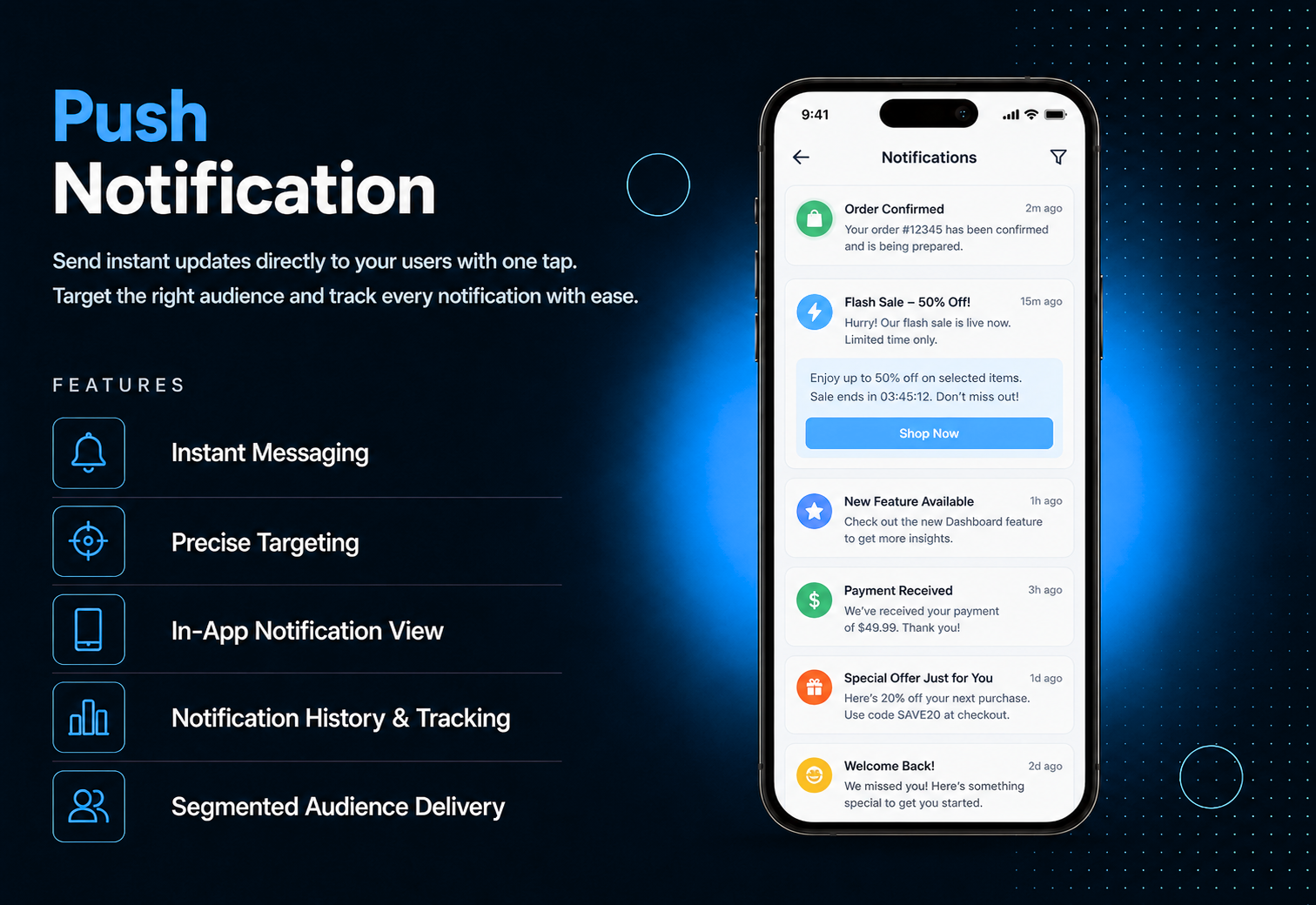
Never let an important update go unnoticed. Push Notifications lets you send instant messages directly to your users’ devices — with a title, message, and optional image reaching the right people at exactly the right moment. One tap from your dashboard and your message is live. Target your audience precisely send to all subscribed devices, Android only, iOS only, logged-in users, anonymous users, or any custom segment. Users receive the notification on their screen and can tap to view full message details inside the app. Every notification sent is tracked in the history log so you always know what went out and when.
The admin panel makes sending notifications effortless. Write a title, add your message, attach an optional image, and choose your target segment — all subscribed devices, Android only, iOS only, PWA, Huawei, logged-in users, or anonymous users. Hit send and your notification reaches every selected device instantly. The History tab keeps a complete record of all notifications sent so you can track your communication at any time.
Users receive your push notification directly on their device screen — even when the app is closed. A simple permission prompt ensures users opt in to receive messages. Once allowed, every notification you send appears instantly with your title and message. Tapping the notification opens the app and shows full message details. Users can view a list of all received notifications inside the Push Notifications module — nothing gets missed.
All features available as soon as the module is unlocked. No extra configuration.


All features available as soon as the module is unlocked. No extra configuration.








Everything you need to know about AppMin CMS
Yes — choose from multiple segments including Android only, iOS only, logged-in users, anonymous users, and more.
Yes — users are prompted to allow notifications when they first access the module, ensuring proper opt-in.
Yes — attach an optional image to any notification. Android and web will display it directly.
Inside the Push Notifications module, users can view a full list of all messages received from the app.
Yes — the History tab keeps a complete log of all notifications sent from the admin panel.
Join 2,400+ businesses, agencies and resellers already building with AppMinCMS. Pick your path and start today.
WhatsApp us
Everything you need to build, launch and grow
Built for every type of business — pick your use case

Please enter your name and email below, and we’ll send you your demo platform link, username, and password directly to your inbox. Explore our platform and discover how it can transform your business!

Our team will contact you soon!
Still having trouble?
Our team will get you set up right away
Your lifetime plan request has been received. Our team will contact you shortly.

WE’LL CONTACT YOU AT
Usually within 24 hours
If you don’t hear from us, please check your spam folder or wait up to 24 hours.
Still having trouble?
Our team will get you set up right away
Your request has been received. Our team will contact you shortly.
WE’LL CONTACT YOU AT
Usually within 24 hours
If you don’t hear from us, please check your spam folder or wait up to 24 hours.
Still having trouble?
Our team will get you set up right away
Your free trial account has been created.
Check your inbox to get started.
Login details sent to
Usually arrives within 1–2 minutes
If you don't see it, check your spam or junk folder, search for "AppMinCMS", or wait up to 5 minutes.
Still having trouble?
Our team will get you set up right away
Pay once. Own it forever — no monthly fees, no surprises.
By signing up you agree to our Terms of Service and Privacy Policy. We never share your data with third parties.
Tell us a little about your business, deployment needs, and Enterprise requirements. This takes around 3 minutes and helps us recommend the right setup.
These services are available by agreement and may affect the final Enterprise proposal.
Our team will review your requirements and contact you personally with the next steps. For Enterprise requests, we usually recommend a short call so we can understand your deployment needs, support expectations, app volume, and license structure properly.