

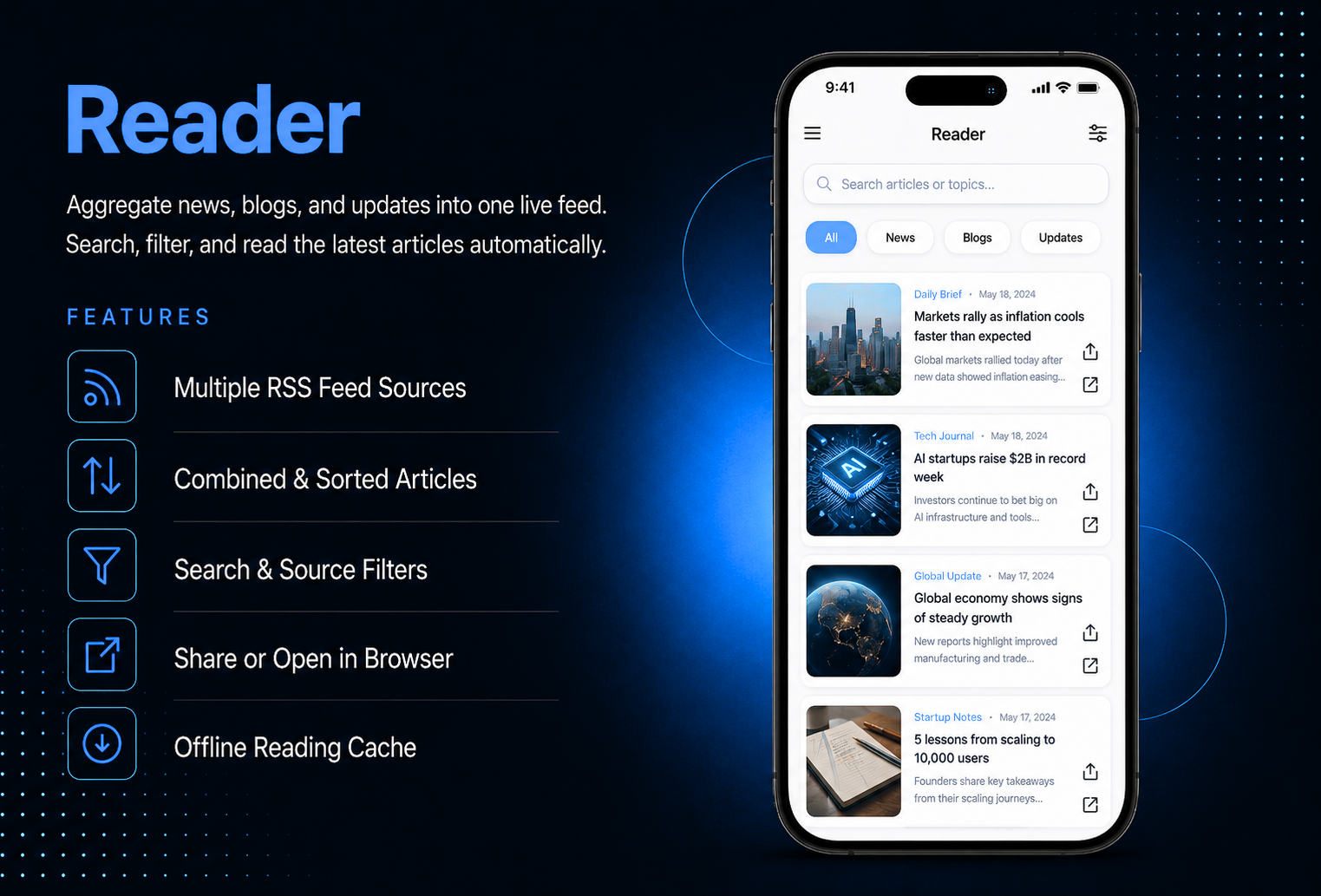
Bring the latest news, blog posts, and updates directly into your app automatically.The Reader module lets you add any RSS feed source and the system fetches, combines,and displays the latest articles in a clean, browsable list no manual updates, no content management needed.Add multiple feed sources in one module instance articles from all feeds are combined and sorted by date so users always see the most recent content first. Each article shows the source label, date, featured image, and excerpt.Users can filter by source, search by keyword, pull to refresh, share any article, or open it in the browser.Articles are cached locally so content remains accessible even when offline.
The admin panel gives you complete control over your content sources and display settings. Add as many RSS feed URLs as you need — each with a display name, article limit, and active status. The system validates each URL on save and only accepts valid RSS or Atom feeds — invalid URLs are rejected with a clear error message. Reorder feeds with drag and drop to control how articles are prioritized when published at the same time. In Display Settings, choose between List and Card layout, toggle source labels, dates, excerpts, and featured images, and set the automatic refresh interval from 15 minutes to 24 hours.
Users open the Reader module and see a clean list or card view of the latest articles from all active feeds — sorted by publication date with the most recent at the top. Each article shows the featured image, title, source name, date, and a short excerpt. A search bar at the top filters articles by title or excerpt in real time, and source filter tabs let users browse articles from a specific feed. Tap any article to read the full content on the detail screen — with a Share button to send the article to others and an Open in Browser button to read it on the original website. Pull down to refresh and get the latest articles instantly.
All features available as soon as the module is unlocked. No extra configuration.





All features available as soon as the module is unlocked. No extra configuration.





Everything you need to know about AppMin CMS
The module supports any website or platform that publishes a standard RSS or Atom feed — including news websites, WordPress blogs, Medium publications, YouTube channels, podcasts, and Reddit subreddits. Social media platforms such as Facebook, Instagram, and TikTok do not provide public RSS feeds and are not supported.
Articles are refreshed automatically at the interval you configure in Display Settings — options range from every 15 minutes to every 24 hours. Users can also trigger a manual refresh by pulling down on the article list at any time.
Yes — add as many feed sources as you need within one module instance. Articles from all active feeds are combined into a single list sorted by publication date, with the source label displayed on each article so users know where it came from.
The most recently fetched articles are cached locally on the device. Users see the cached articles with a message indicating they are offline. They can read all cached content — only the Open in Browser button is disabled until the connection is restored.
Yes — set an article limit per feed when adding it. Options are 5, 10, 15, 20, or 25 articles. Only the most recent articles up to that limit are fetched and displayed from that feed.
Join 2,400+ businesses, agencies and resellers already building with AppMinCMS. Pick your path and start today.
WhatsApp us
Everything you need to build, launch and grow
Built for every type of business — pick your use case

Please enter your name and email below, and we’ll send you your demo platform link, username, and password directly to your inbox. Explore our platform and discover how it can transform your business!

Our team will contact you soon!
Still having trouble?
Our team will get you set up right away
Your lifetime plan request has been received. Our team will contact you shortly.

WE’LL CONTACT YOU AT
Usually within 24 hours
If you don’t hear from us, please check your spam folder or wait up to 24 hours.
Still having trouble?
Our team will get you set up right away
Your request has been received. Our team will contact you shortly.
WE’LL CONTACT YOU AT
Usually within 24 hours
If you don’t hear from us, please check your spam folder or wait up to 24 hours.
Still having trouble?
Our team will get you set up right away
Your free trial account has been created.
Check your inbox to get started.
Login details sent to
Usually arrives within 1–2 minutes
If you don't see it, check your spam or junk folder, search for "AppMinCMS", or wait up to 5 minutes.
Still having trouble?
Our team will get you set up right away
Pay once. Own it forever — no monthly fees, no surprises.
By signing up you agree to our Terms of Service and Privacy Policy. We never share your data with third parties.
Tell us a little about your business, deployment needs, and Enterprise requirements. This takes around 3 minutes and helps us recommend the right setup.
These services are available by agreement and may affect the final Enterprise proposal.
Our team will review your requirements and contact you personally with the next steps. For Enterprise requests, we usually recommend a short call so we can understand your deployment needs, support expectations, app volume, and license structure properly.