

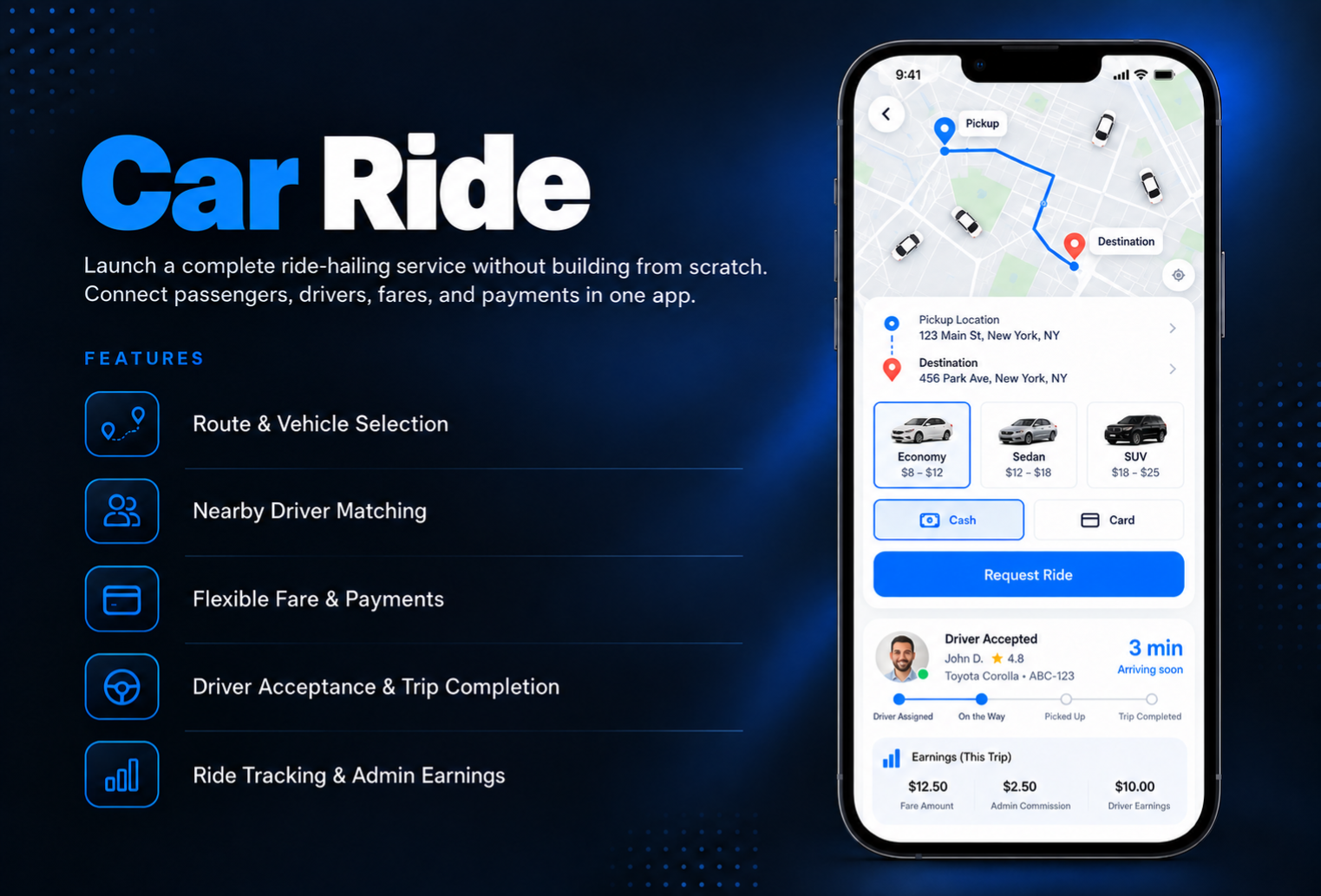
Launch your own Car Ride without building an app from scratch. Cab Ride connects passengers with nearby drivers passengers set a route, choose a vehicle type, and request a ride, while drivers receive the request, accept it, and complete the trip from their own driver screen.Choose whether fares are fixed per vehicle type or set by each driver, accept cash, card, or both, and earn through a fixed or percentage commission on every ride. The admin tracks all rides, payments, and earnings, and manages driver payouts and cash return requests. It works for a single taxi or a full fleet.
The admin panel covers every part of your ride-hailing operation. In Settings, set the currency, distance unit, map center, search radius, and request timeout. Choose accepted payment methods, the pricing mode, and your commission type. Create vehicle types with a name, illustration, and fares. Manage drivers, and choose whether new users can register as drivers or need to be upgraded from passenger by admin. View every ride and its status from the Rides page, and follow earnings in the Dashboard with daily, weekly, monthly, and yearly totals. In Accountancy, create driver payouts for card payments and send cash return requests for commissions on cash rides, with CSV export for bulk payouts.
When users first open Cab Ride, they choose a role: passenger or driver. Passengers see nearby online drivers on the map, enter a destination to get the estimated distance and duration, and request a ride. They pick from available vehicle types with a price shown, choose a payment method, and can save cards for faster checkout. They get a push notification when a driver accepts and can call the driver directly. Drivers add their vehicle details, go online, and receive push notifications for matching requests. They can accept or decline a request, notify the passenger they are on the way, start the trip, and open navigation in Waze, Google Maps, or Apple Maps.
All features available as soon as the module is unlocked. No extra configuration.


All features available as soon as the module is unlocked. No extra configuration.


Everything you need to know about AppMin CMS
The passenger enters a destination to see the estimated distance and duration, then starts a search for nearby drivers. Once drivers are found, they choose a vehicle type, select a payment method, and the request is sent. When a driver accepts, the passenger gets a push notification.
You choose the pricing mode in Settings. Fares can be fixed per vehicle type by the admin, or each driver can set their own rates from their vehicle information screen.
Enable a commission in Settings as either a fixed amount or a percentage of each ride. For card payments, the commission is kept and the rest is paid out to the driver. For cash rides, drivers collect the full fare and you send them a cash return request for the commission owed.
That depends on your settings. If driver registration is enabled, new users can choose the driver role when they first open the module. If it is disabled, every new user becomes a passenger and admin can upgrade selected passengers to drivers.
Each request stays pending for the search timeout you set. While it is pending, the passenger can cancel it. If no driver accepts before the timeout ends, the request expires.
Join 2,400+ businesses, agencies and resellers already building with AppMinCMS. Pick your path and start today.
WhatsApp us
Everything you need to build, launch and grow
Built for every type of business — pick your use case

Please enter your name and email below, and we’ll send you your demo platform link, username, and password directly to your inbox. Explore our platform and discover how it can transform your business!

Our team will contact you soon!
Still having trouble?
Our team will get you set up right away
Your lifetime plan request has been received. Our team will contact you shortly.

WE’LL CONTACT YOU AT
Usually within 24 hours
If you don’t hear from us, please check your spam folder or wait up to 24 hours.
Still having trouble?
Our team will get you set up right away
Your request has been received. Our team will contact you shortly.
WE’LL CONTACT YOU AT
Usually within 24 hours
If you don’t hear from us, please check your spam folder or wait up to 24 hours.
Still having trouble?
Our team will get you set up right away
Your free trial account has been created.
Check your inbox to get started.
Login details sent to
Usually arrives within 1–2 minutes
If you don't see it, check your spam or junk folder, search for "AppMinCMS", or wait up to 5 minutes.
Still having trouble?
Our team will get you set up right away
Pay once. Own it forever — no monthly fees, no surprises.
By signing up you agree to our Terms of Service and Privacy Policy. We never share your data with third parties.
Tell us a little about your business, deployment needs, and Enterprise requirements. This takes around 3 minutes and helps us recommend the right setup.
These services are available by agreement and may affect the final Enterprise proposal.
Our team will review your requirements and contact you personally with the next steps. For Enterprise requests, we usually recommend a short call so we can understand your deployment needs, support expectations, app volume, and license structure properly.