
The App Store is the stricter of the two stores — but the process is the same shape: a developer account, a build, a review. Here’s exactly what to expect.
The Apple developer account #
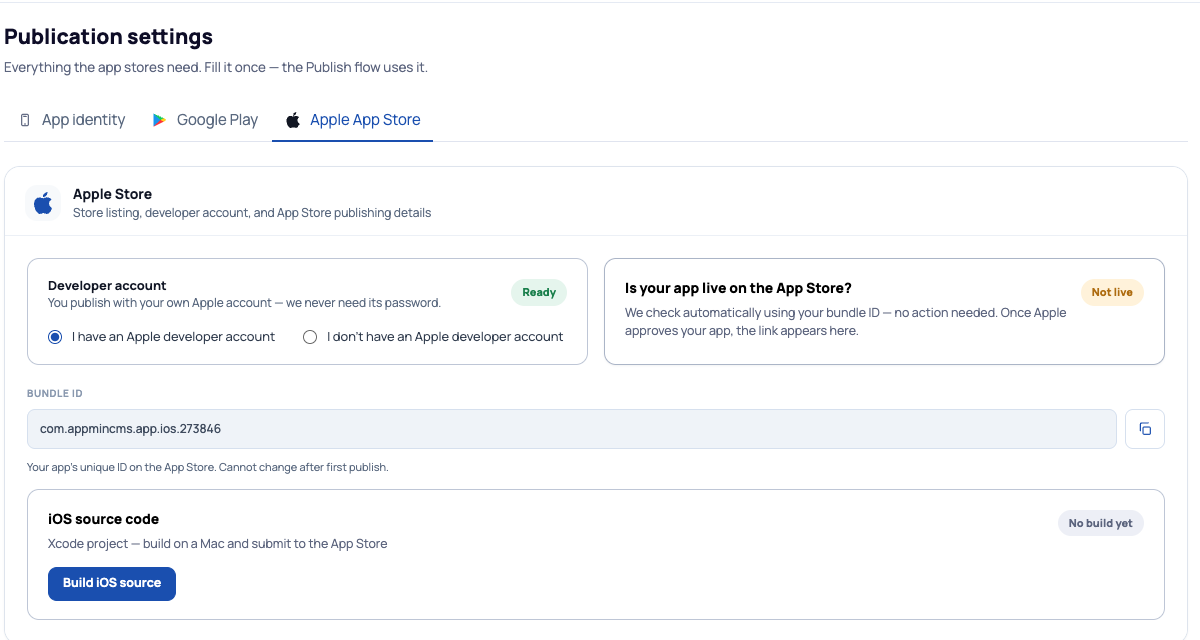
Publishing needs an Apple Developer account ($99/year with Apple). Select your situation on the Publication → Apple App Store tab — as with Google, your account’s password is never needed by the platform.
Whose account? Usually your own, published in your name. If a partner or agency handles publishing for you as part of their support, they may use the account they manage — both ways work.
Your Bundle ID #
The Bundle ID is your app’s unique identity on the App Store. It’s generated for you — and one rule matters: it cannot change after your first publish. Moving from another platform? Enter your existing Bundle ID instead so your build updates the same app (guide 6).
Build and submit #
- Press Build iOS source — this generates the Xcode project for your app.
- iOS submissions are made from a Mac: the project is opened in Xcode, built, and uploaded to App Store Connect, where you fill the store listing and submit for review.
- Apple’s review usually takes a few days; first submissions get the closest look.
No Mac? This is exactly the step where a partner, agency or our team typically helps — the build-and-upload part is a one-time hurdle, not a recurring one.
Once Apple approves, the platform detects it automatically using your Bundle ID — the App Store link appears on this tab when your app is live. No action needed.
When do I need to resubmit? #
| Change | New store submission? |
|---|---|
| Adding or removing modules | No — updates in the app automatically |
| Design, theme, colors, content | No — updates automatically |
| The app itself gains new app-side features | Yes — a fresh iOS build, submitted as an update |
Common questions #
- Apple rejected my app.
- Apple’s feedback is specific — most rejections are small (metadata, a screenshot, the privacy link). Fix and resubmit; second reviews are usually quick.
- Privacy policy?
- Publication → App identity hosts one for you — that link satisfies both stores.
- Full-screen splash looks different on Android?
- That’s expected — the full-screen splash image is iOS-only; Android always shows your logo on the background color.