
Build Native iOS, Android & Web Apps — All from One CMS

Publish on Google play store

3 min read Updated September 14, 2026 Getting started
On this page

    Your web app is live (guide 3) — now let’s get your app into Google Play, where customers search and install. The platform generates everything technical for you; your part is a developer account and a bit of patience with Google’s review.

    Test on a real phone first #

    Before anything store-related, generate an APK — an installable file you can put on any Android phone:

    • Go to Publication → Google Play and press Generate APK (takes 5–20 minutes).
    • Install it on your phone and tap through everything like a customer would.
    • It’s also perfect for sharing — send the APK to a colleague or client so they can try the real app before it’s public.
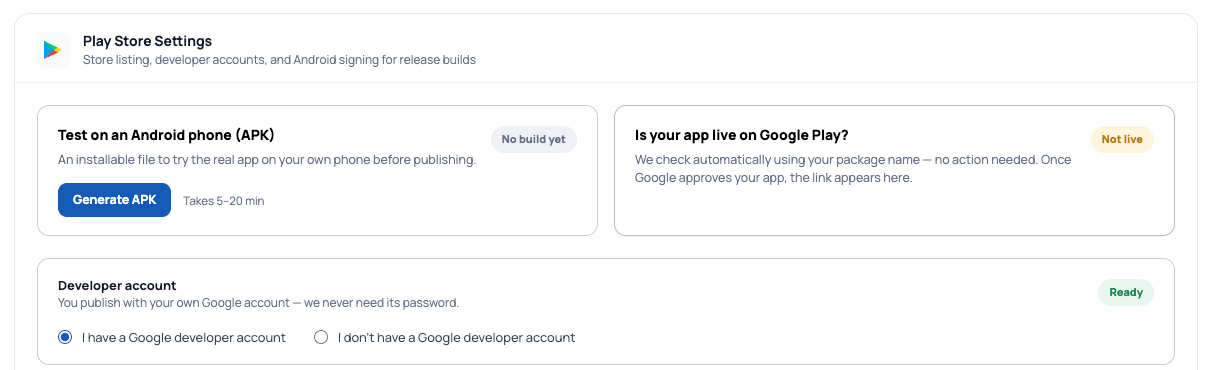
    Google Play tab with Generate APK, live-status check and developer account section
    Figure 1. The Google Play tab — test APK on the left, automatic live-status check on the right, developer account below.

    The developer account #

    Publishing happens through a Google Play developer account — a one-time $25 registration with Google. Select the option that matches you on the Google Play tab; your account’s password is never needed by the platform.

    Whose account? Usually your own — the app is published in your name and you stay in control. If a partner or agency manages publishing for you, they may handle this part through the account they use for support. Both ways work.

    App signing (done for you) #

    Google verifies every update to your app with a signing key. The platform creates and stores it automatically — the “Android App Signing” section shows your package name, key alias and passwords, all pre-filled.
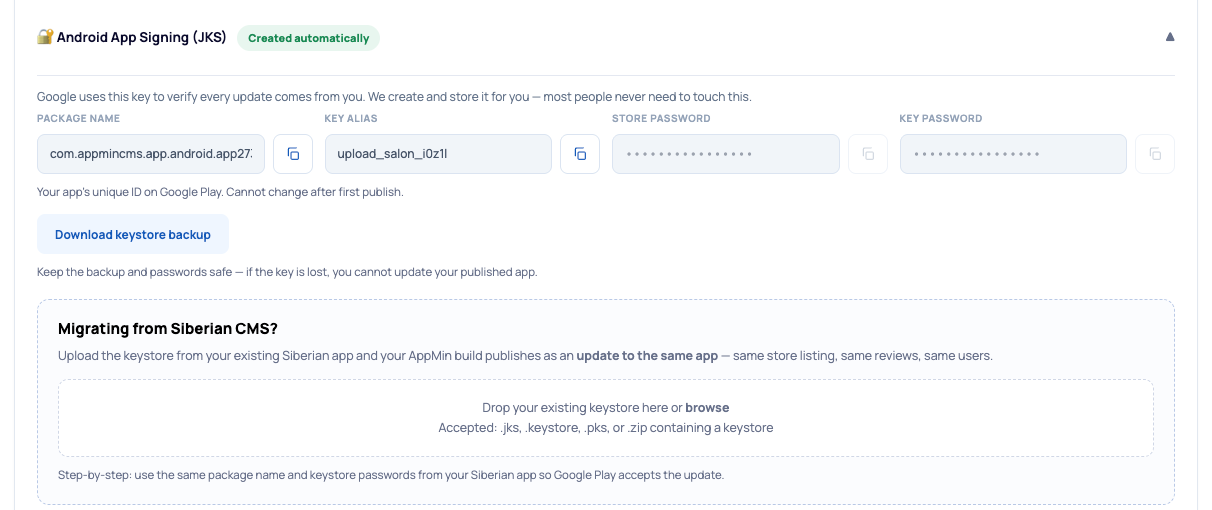
    Android App Signing section with package name, alias, passwords, keystore backup and the Siberian migration drop zone
    Figure 2. Signing, handled — created automatically, plus the migration drop zone if you’re coming from Siberian CMS (guide 6).

    Do press Download keystore backup and keep it somewhere safe. If the key is ever lost, your published app cannot be updated — this one download is your insurance.

    Generate the release file and submit #

    • Press Generate AAB — the Google Play release file (5–20 minutes).
    • Upload it in your Google Play Console, fill your store listing (name, description, screenshots), and submit for review.
    • Reviews usually take a few days for a first app. Updates are typically faster.

    Build Android files section with Generate AAB and Android source code options
    Figure 3. Build Android files — the AAB is what Google Play wants. Android source is there too, for developers only.

    After approval you don’t need to tell anyone: the platform checks automatically using your package name, and the Play Store link appears on this tab once your app is live.

    When do I need to resubmit? #

    ChangeNew store submission?
    Adding or removing modulesNo — updates in the app automatically
    Design, theme, colors, contentNo — updates automatically
    The app itself gains new app-side featuresYes — generate a fresh AAB and submit it as an update

    This is the part people love: day-to-day changes never touch the store. You only rebuild when the underlying app gets new native capabilities — and you’ll be told when that happens.

    Common questions #

    Google rejected my app — now what?
    Read the rejection reason carefully (it’s usually specific: a missing privacy policy link, a screenshot issue), fix it, resubmit. Rejections are normal and fixable.
    Where’s the privacy policy?
    Publication → App identity — the platform can create and host one for you; the link is what Google Play asks for.
    Migrating from Siberian CMS?
    Use the migration drop zone in the signing section so your build updates your existing listing — full walkthrough in guide 6.
    Resources

    Resources

    Everything you need to build, launch and grow

    Build your app in minutes

    Solutions

    Built for every type of business — pick your use case

    White-label

    Earn monthly

    Build your app in minutes

    We'll send your login details to this email — double check it's correct!
    Or

    You're all set!

    Our team will contact you soon!

    Still having trouble?

    Our team will get you set up right away

    Template / Layout Development

    Need a unique app design? Request a custom layout tailored to your brand.

    What Do You Need?

    CUSTOM TEMPLATE From €199
    CUSTOM LAYOUT From €299
    Template changes the visual style, colors, and branding. Layout changes navigation, app flow, and content structure.

    Preferred Timeline

    No rush
    1-2 weeks
    3-4 weeks
    Specific Deadline

    Upload attachments — wireframes, screenshots, documents (optional)

    Click to upload files PDF · PNG · JPG · DOC · Figma link — max 10MB per file

    Custom Module Development

    Need a feature that does not exist in our module library?

    Preferred Timeline

    No Rush
    1–2 Weeks
    3–4 Weeks
    Specific Deadline

    Upload Attachments

    📎 Click to upload wireframes, screenshots or documents

    Estimated Complexity

    SIMPLE From €499
    MEDIUM From €999
    COMPLEX From €1,999
    NOT SURE

    Try a free Demo Today !

    Please enter your name and email below, and we’ll send you your demo platform link, username, and password directly to your inbox. Explore our platform and discover how it can transform your business!

    You're all set!

    Your lifetime plan request has been received. Our team will contact you shortly.

    WE’LL CONTACT YOU AT

    Usually within 24 hours

    If you don’t hear from us, please check your spam folder or wait up to 24 hours.

    Still having trouble?

    Our team will get you set up right away

    You're all set!

    Your request has been received. Our team will contact you shortly.

    WE’LL CONTACT YOU AT

    Usually within 24 hours

    If you don’t hear from us, please check your spam folder or wait up to 24 hours.

    Still having trouble?

    Our team will get you set up right away

    You're all set!

    Your free trial account has been created.

    Check your inbox to get started.

    Login details sent to

    Usually arrives within 1–2 minutes

    If you don't see it, check your spam or junk folder, search for "AppMinCMS", or wait up to 5 minutes.

    Still having trouble?

    Our team will get you set up right away

    Lifetime plan

    Pay once. Own it forever — no monthly fees, no surprises.

    We'll send your login details to this email — double check it's correct!

    By signing up you agree to our Terms of Service and Privacy Policy. We never share your data with third parties.

    Apply for AppMinCMS Enterprise

    Apply for AppMinCMS Enterprise

    Tell us a little about your business, deployment needs, and Enterprise requirements. This takes around 3 minutes and helps us recommend the right setup.

    • No payment required
    • Dedicated deployment available
    • Lifetime usage rights for the agreed Enterprise deployment
    • Source code ownership is not included
    • Our team will review your request personally
    STEP 1 OF 5

    Tell us about you

    STEP 2 OF 5

    Deployment requirements

    Enterprise is designed for a dedicated/private white-label deployment managed by AppMinCMS. You receive your own branded platform experience while AppMinCMS manages the core platform, updates, security, maintenance, and ongoing stability.
    STEP 3 OF 5

    Additional services

    These services are available by agreement and may affect the final Enterprise proposal.

    STEP 4 OF 5

    Final details

    STEP 5 OF 5

    Enterprise license understanding

    Enterprise includes lifetime platform usage rights for the agreed dedicated white-label deployment.
    Lifetime usage rights do not include free hosting, infrastructure, support, maintenance, updates, custom development, or custom modules forever.

    The following are not included: source code access, source code ownership, server root access, FTP/SFTP access, unmanaged deployment rights, and the right to duplicate or redeploy the platform.

    Thank you — your Enterprise request has been received

    Our team will review your requirements and contact you personally with the next steps. For Enterprise requests, we usually recommend a short call so we can understand your deployment needs, support expectations, app volume, and license structure properly.

    Book a call
    Takes around 3 minutes